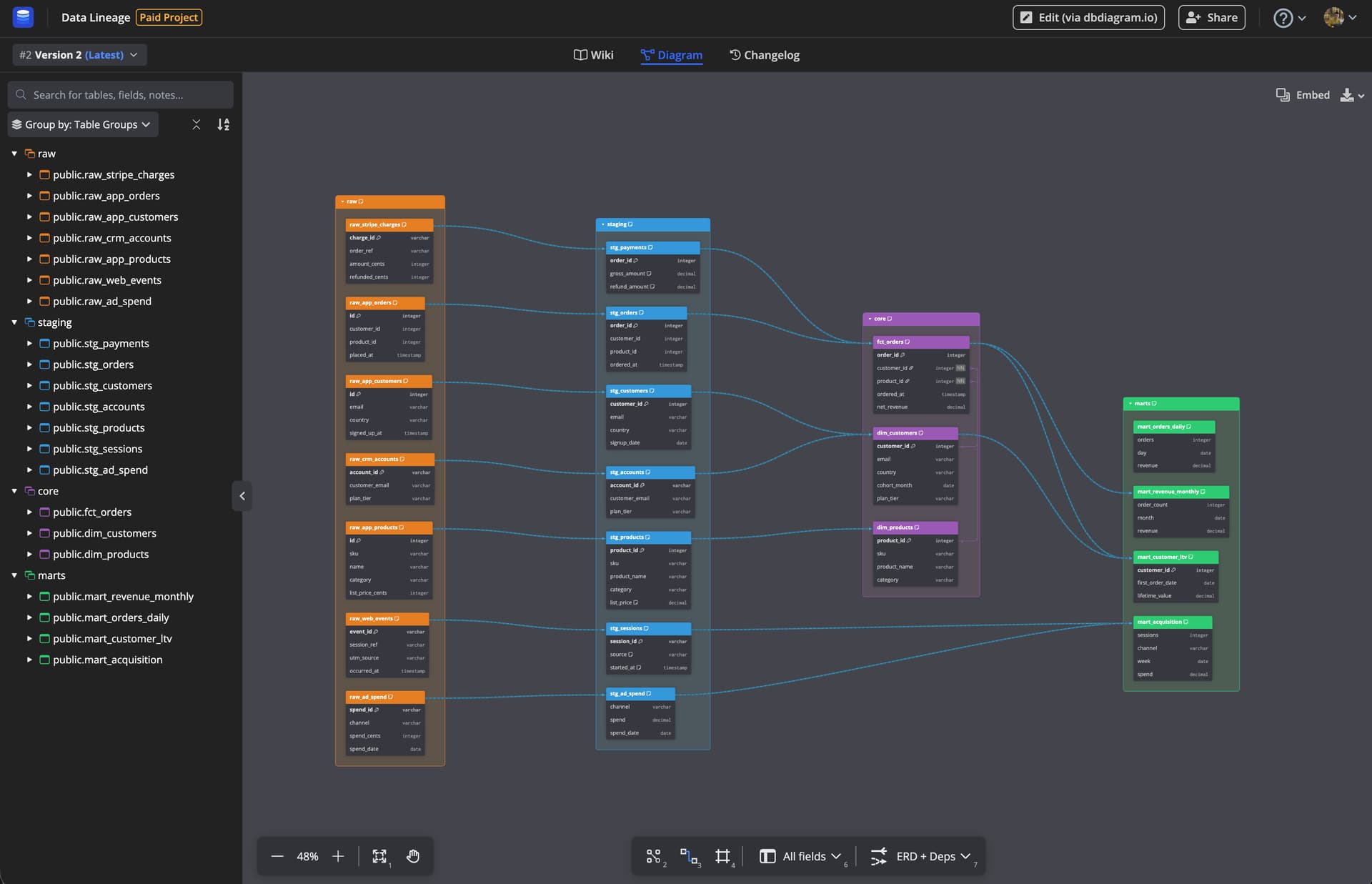
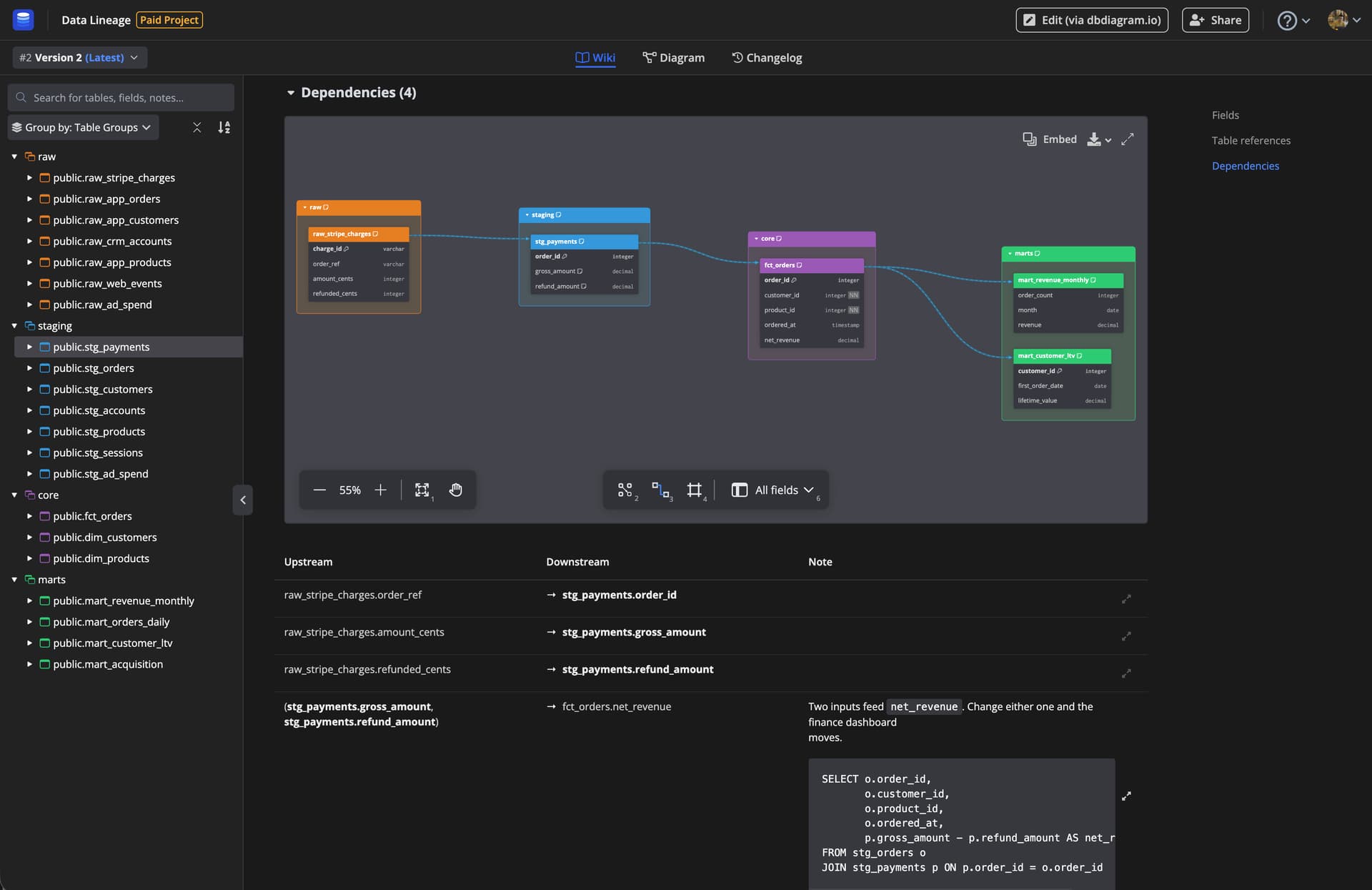
We’re excited to announce that dbdiagram and DBML now support visualizing data lineage: how your data moves and transforms across tables.
You define dependencies with the new Dep syntax:
// one line per step
Dep: stripe_payments -> daily_orders [note: 'Cleaning: drops voided charges']

// or map the columns, and pull several tables into one
Dep monthly_revenue_build {
  daily_orders.amount -> monthly_revenue.revenue
  daily_orders.ordered_at -> monthly_revenue.month
  refunds.amount -> monthly_revenue.refunds

  note: 'Aggregation: orders by month, minus refunds.'
}
Why it matters:
Design before you build. One line per step is enough to sketch a whole pipeline in plain text, and get review on its shape before any SQL exists.
Answer “where does this number come from”. Map single columns, then click one in the diagram and every table it travelled through lights up.
Schema and flow on one canvas.Ref and Dep draw as different edge styles, so you can show them together or separately, whichever the diagram needs.
Notes explain what each step does. Add a note to any dependency to describe the step in plain words, so the meaning sits beside the arrow instead of in a separate doc.
Reading lineage straight from a dbt project or your warehouse is what we are working on next.
Note: Data lineage is available on all plans, with no limit on project size.
@MLOB Hi, dbdocs hasn’t supported data deps syntax yet. We plan to support it by the end of this week or start of next week. Thank you for your patience and sorry for the inconvenience!
Hi @JayOnSoftware, currently, when importing from SQL to DBML, views/data lineage code in DDL can be converted to DBML deps in a best-effort manner.
However, when exporting from DBML to SQL, deps in DBML wouldn’t be preserved as the original data lineage in the output DDL.
We’re supporting multifile feature (Module System | DBML), to split up the part of DBML that can round-trip from DDL → DBML → DDL and the part of DBML that cannot like data lineage. However, dbdocs isn’t currently supporting this feature. We’re in the progress of rolling this out.
Here, all names are inserted into the Name column from table T, but nowhere is it mentioned whether it is concat, coalesce, or union. Generating DML in this condition is almost impossible.
Let me know your view.
Hi @JayOnSoftware, could you confirm if you’re asking whether Deps in DBML would be exported to SQL? If so, currently, the answer is no
Regarding @Ashish_Bajpai’s reply, yes, it’s hard to identify from DBML alone the original DML that went into the transform. However, we did introduce some workarounds, by allowing users to just embed the original DML in DBML.
dep {
  S1.Name -> T.Name
  S2.Name -> T.Name
  S3.Name -> T.Name

  query: '''
    <DML that defines the transform>
  '''
}
However, this is currently for pure documentation purpose and is not exported yet. But maybe, in the future, it can help preserve the lineage DML when exporting to SQL
 Read the full syntax docs →