Currently if I rename a table… it flies off to the bottom left of the entire diagram… i have to zoom out… find it… and drag it back into position… This becomes a very large annoyance if dealing with a large diagram…
Double clicking a table should just let you type in a new name and update all the relations/assoc.
Agreed, the tables really do need to stay put during a rename. I was doing a naming convention update across a large schema with AI handling the changes in the DBML, but as the user above describes the diagram resets the table positions and reflows the layout. On a large schema, that means a simple naming convention cleanup can undo all the manual diagram organization.
To avoid the tables “flying off” I tried using table aliases instead of renaming, but the aliases don’t show in the diagram.
It would be really helpful if dbdiagram supported one or more of these:
- preserve table positions across renames
- auto update the relationships during a table rename
- track diagram layout independently of the table names
- allow aliases to be used as the displayed diagram label
- store/export layout metadata separately from the DBML
Layout is a big part of readability for larger schema, so losing it during refactoring makes iterative cleanup much harder.
1 Like
Hi @Jared_Marshall ,
Thank you for the feedback. We already supported renaming the table in-place instead of via DBML edit. The rename process will also auto-update the related table name in the relationship and preserve the table layout.
You can find the table rename function by hovering over the table header in your diagram and then clicking on the cog icon.
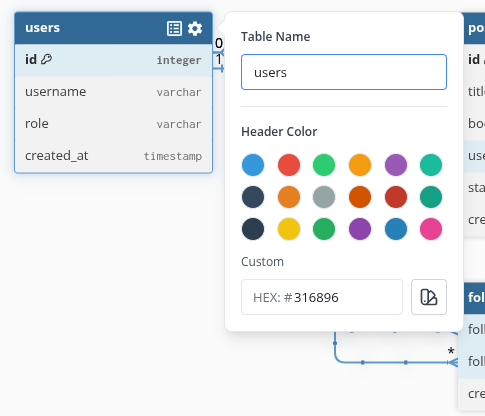
Lastly, we also intend to support storing and exporting the layout as code in the future.
I hope this helps.
1 Like